
31 juli, 2007

The Eye of the Tiger (Or Cat)


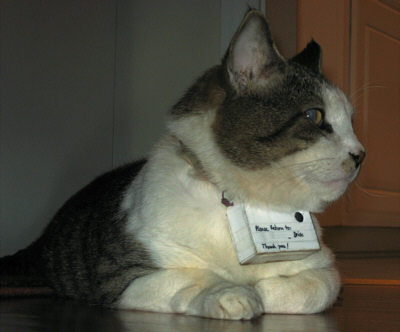
Jag hamnade på en tysk sida igår om en Jürgen som har byggt en liten kamera och satt runt sin katts hals för att se vad den hade för sig om dagarna. Bilderna talar för sig själv.

Jag började fundera på hur detta skulle gå med vår katt, Pubi. För det första skulle vi ju visserligen inte få på honom någon kamera runt halsen. Vi försökte en gång med halsband, men fick han tokspel och skulle stoppa in tassen för att slita av sig det, men då fastnade han och höll på att strypa sig själv. Sen dess har vi försökt med ett koppel som går mellan benen och runt magen, men det tar han sig ur, utbrytarkungen.

Ponera att vi faktiskt fick på honom den här kameran. Vad skullle det bli för bilder? Vad gör vår katt på en dag? Jag vill tro att jag har rätt bra koll på det, utan kamera. Ungefär såhär ser det ut, en dag i Pubis liv:

6:45 Vaknar och går upp.
6:50-7:15 Jamar för uppmärksamhet och mat
7:15 Går och lägger mig igen.
7:16 Sover
12:01 Sträcker ut bakbenen
12:02 Uträttar behoven i lådan
12:03 Tar med mig lite extra sand att sprida ut
12:04 Kollar om matte/husse ser mig, klöser lite i mattan
12:10 Äter/Dricker
12:12 Uträttar behov i lådan
12:15 Går och lägger mig
12:30 Blir bortkörd för att jag inte får ligga i sängen
12:31 Masar mig till soffan istället, somnar
17:00 Husse kommer hem, går och tittar
17:10 Tvättar mig. Noga. Överallt
18:00 Tittar när matte/husse lagar mat
18:05 Yes! De tappade mat! Äter
18:10 Går och lägger mig
19:00 Blir kliad och klappad
19:45 Äter
19:47 Uträttar behov i lådan
19:50 Går och lägger mig
19:50-00 Sover

Jag vet inte om det skulle bli så mycket att titta på, bilder från sängen och lådan. Kanske någon bild från vägen däremellan.

Tänk om man kunde sätta en kamera i min frus mage istället. Lennart Nilsson goes web 2.0! Det tror jag skulle slå. Fast det klart, då gäller det ju verkligen att kameran är vattentät.
0 kommentarer:

30 juli, 2007

Aj för het mat

Iag kang inke shckriwa mew schör iag haw bwänt mig i gommen bå waim mak.

0 kommentarer:

HOW TO: Live a truly mobile life (for real)

But don't fear, for I am here. I will give you the tips you need to keep your web 2.0 savvy life au-jour even if you're out on the run.
So you've got your whole life on the net. You use GCal for calendar management, you use GMail and GTalk for keeping in touch, you blog and you let everyone know what you're doing with twitter. This is the way many of our lives look today.

Sure, this is great to use as long as you've got access to a computer. But who wants to sit in fron of a screen the whole day? Then there would be nothing to blog about, or events to add to the calendar. Yes, you might still have some IM friends who don't mind never seeing you IRL, but sooner or later (depending on your cash status) your income probably will drop for never working, and then your ISP will close your broadband for not payin your bills. THEN you will have no friends. Sounds good? Nah, didn't think so.

But don't fear, for I am here. I will give you the tips you need to keep your web 2.0 savvy life au-jour even if you're out on the run.

This requires you own a cellphone. Fairly new (with new I mean not older than it can send SMS). Preferrably your phone can use JAVA apps and use GPRS or 3G.

The spider of the web is Twitter. This service seems very open, and a lot of other services are linking with twitter, which is very good. If you dont have an account, get one.

Then what you need to do is learn how to update you twitter from your phone. You can do this either via SMS or from a JAVA client. I use one called Jitter, which is great, but there are others out there, so find one you like.

The last step is to add the bots for the services you need. For example, if you add GCal (or "follow" as it's called on twitter) to your friends list, you can send a direct message using GCal's Quick Add Syntax, and it will automatically add an event to your Google Calendar. Nice!

There are bunch of twitter bots out there, so choose your likings.

The Bonus level is if you're lucky your phone is supported by GooSync, because then you can sync your GCal with your phones native calendar. That way you don't have to use those not so savvy mobile versions.

For your blogging needs, just use Shozu. Period.

The way I use this is I've got a Sony Ericsson W880i. It's got a blogging client already installed, so I don't need Shozu. Using Jitter, I update my twitter status, I send direct messages to my "bots" adding events to both GCal and Remember The Milk. I also check my Gmail occasionally, but that's not so savvy.

So congrats, you can now roam out in the sun without worrying about anything except those not so nifty data costs. Remedy? Get a flat rate data plan. I don't have one, so I have to think before I use. However, Jitter is completely text-only, so there isn't much data getting sent each time.

Good luck!

0 kommentarer:

27 juli, 2007

Fix that png transparency for your blogger blog!

So I've finally solved that annoying PNG transparency bug in IE. Or rather, I found an availible solution that suited my specific needs.

I started off trying to use the pngbehavior.htc file (get it here) from Erik Arvidsson, of WebFX, which worked wonders with my main site, where I could place the file locally on my server.

This became a problem with my blogger blog, which resides hosted by blogger. There was no way for me to upload the pngbehavior.htc (am I wrong, anyone?) and trying to access the one uploaded on my server was apparently not allowed. Furthermore, since the script is called via a behavior statement in the css, I had no way to implement the script code inline in the blog's html edit mode.

But then, today, after searching more specifically for png bug within blogger, I came across the magic solution. It was a hallelujah moment! And this is where I found it. However, I don't know what this guy did, but the code can't be copied (unless you do what I eventually did, I viewed the source and copied it from there and them tidied it up a bit).

So, I will publish the code for all of you to enjoy:

<script type="text/javascript"><!--
if( (navigator.platform == 'Win32') &&
/MSIE (5\.5[6-9])/.test( navigator.userAgent ) )
{
for( var I, i = 0; i<document.images.length; i++ )
if( /\.png$/.test( (I = document.images[i]).src ) )
{
I.style.filter = 'progid:DXImageTransform.Microsoft' +
'.AlphaImageLoader(src="'+I.src+'",sizingMethod="scale")';
I.src = 'http://www.lysator.liu.se/internal-roxen-unit.gif';
}
}//--></script>


Just insert this code at the bottom of your page (but before the </html> tag) and you're all set!

If you're paranoid you might want to follow Johan's advice, and put the linked image (a blank gif) locally on your own server (of course changing the
I.src = 'http://www.lysator.liu.se/internal-roxen-unit.gif';

to your own path, such as I.src = 'your path here';)

I didn't, and neither need you to. If, for some reason, the one hosting the image (which looks to be the University in Linköping, Sweden judging from the domain) were to remove it, we'll all get our blue boxes back on our png's, and I will deal with that problem then.

So start using this script and make the wwworld a nicer place!

3 kommentarer:

26 juli, 2007

Veddesta Köpcentrum

Bredvid mitt jobb ligger Veddesta Köpcentrum, ett palats för kommersen och de köpsugna. Här, och endast här, kan man hitta butiker som:

Databutik (Hmm, jag undrar vad det är för typ av data de säljer där. Fantasirikt namn.)
J.S. Fashion (Namnet säger ju inte så mycket, men om ni såg skylten skulle ni fatta.)
Klädjätten (Det måste ju betyda kläder i extremt stora storlekar.)
Surprise Shop (Här vet man aldrig vad man kommer ut med.)

Fantastiska butiker med fantastiska namn, och förhoppningsvis fantastiska produkter.

Man skulle kunna vara djärv och kalla Veddesta för ett lågprisinriktat köpcentrum.

0 kommentarer: